
 home
home
 Published: May 09, 2026 01:06 PM
 Page View: 134
In the high-stakes environment of factory automation, the Human-Machine Interface (HMI) is the window into the soul of the production line. When communication between the HMI and the Programmable Logic Controller (PLC) breaks down, the "window" goes dark, leaving operators blind and production at a standstill.
Easy Semiconductor Technology (Hong Kong) Limited, a leading global provider of industrial automation components, has released a technical guide to help plant engineers diagnose and restore HMI communications swiftly and safely.
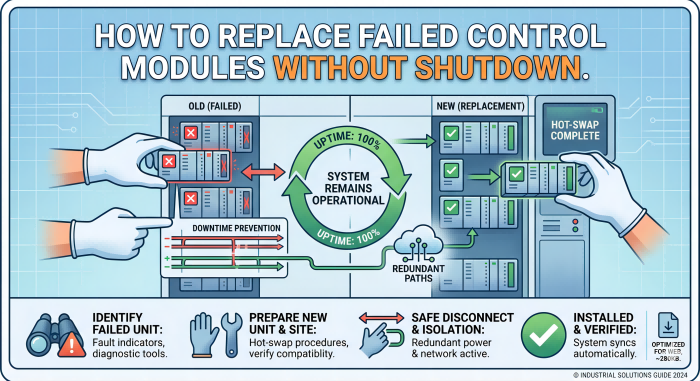
In a modern smart factory, communication failures aren't just technical glitches; they are financial leaks. A single hour of unplanned downtime in high-precision manufacturing can cost tens of thousands of dollars. Communication loss usually manifests as "frozen" data values, "Timeout" error pop-ups, or the dreaded "PLC Communication Fail" message on the HMI terminal.
"Restoring communication is rarely about replacing the hardware immediately," explains a technical director at Easy Semiconductor. "It is about systematic isolation—checking the physical layer, the protocol layer, and the configuration settings in a logical sequence."
The most common cause of HMI communication failure is the simplest: a loose or damaged cable. Before diving into software parameters, engineers should perform a physical audit.
Cable Integrity: Inspect Ethernet (RJ45), RS-232, or RS-485 cables for physical wear, sharp bends, or corrosion. In high-vibration environments, connectors can gradually vibrate out of their sockets.
EMI/RFI Interference: Industrial environments are electromagnetically noisy. Ensure that communication cables are shielded and separated from high-voltage power lines to prevent signal "drowning."
Switch and Hub Status: Check the status lights on network switches. A dark port often indicates a dead cable or a blown port on the network hardware itself.
For Ethernet-based HMIs—the industry standard in 2026—IP address conflicts are a frequent culprit, especially after a system expansion or a network reset.
Ping Test: Connect a laptop to the local network and attempt to "ping" both the HMI and the PLC. If the PLC responds but the HMI does not, the issue likely lies with the HMI's internal network card or internal settings.
Subnet Alignment: Ensure both devices are on the same subnet (e.g., ). A common mistake is assigning the PLC an IP that belongs to a different gateway, preventing the HMI from "seeing" its partner.192.168.1.XX
Port Blocking: Ensure that the communication port (e.g., Port 502 for Modbus TCP or Port 44818 for EtherNet/IP) is not being blocked by a local firewall or a managed switch security policy.
If the hardware is connected and the IPs are correct, the problem likely resides in the Protocol Layer. The HMI and PLC must speak the same "language."
Driver Compatibility: HMIs require specific drivers to communicate with different brands (e.g., Siemens, Rockwell, Mitsubishi). Ensure the driver version in the HMI software matches the PLC's current firmware version.
Station Addresses: In serial-based systems (RS-485/Modbus), every device has a unique station ID. If two devices share an ID, or if the HMI is looking for "Station 1" while the PLC is set to "Station 2," communication will fail.
Baud Rate and Parity: For serial communications, the Baud Rate, Data Bits, Stop Bits, and Parity must be identical across both devices. Even a slight mismatch will result in corrupted data packets.
Sometimes the communication link is technically active, but data isn't flowing because of "Tag Errors" within the software project.
Invalid Addresses: If the HMI is trying to read a memory address (Tag) in the PLC that no longer exists or has been renamed, the entire communication driver may hang or cycle in error.
Communication Load: If the HMI is trying to read too many tags too quickly (e.g., polling 5,000 tags every 10 milliseconds), the PLC’s communication processor may become overwhelmed. Increasing the "Poll Time" can often stabilize the link.
A subtle but dangerous cause of intermittent communication loss is "Ground Loops."
Potential Difference: If the PLC and HMI are grounded at different points in a large factory, a voltage difference can exist between them. This current flows through the communication cable’s shield, causing signal corruption.
Voltage Stability: Ensure the DC power supply (typically 24V DC) for the HMI is stable. A dipping power supply can cause the HMI's communication module to reset while the screen remains on, leading to confusing symptoms.
Easy Semiconductor Technology (Hong Kong) Limited recommends three proactive steps to prevent future outages:
Redundant Links: For critical processes, use HMIs that support dual Ethernet ports to create a redundant, fail-safe communication path.
Firmware Management: Keep both PLC and HMI firmware updated to the latest stable versions to patch known communication bugs and security vulnerabilities.
Heartbeat Monitoring: Program a "Heartbeat" bit in the PLC that toggles every second. If the HMI stops seeing this toggle, it can trigger a local alarm before a major failure occurs.
Easy Semiconductor Technology (Hong Kong) Limited is a premier distributor of high-performance industrial automation components. Based in Hong Kong, we specialize in providing the hard-to-find semiconductors, PLC modules, HMI panels, and communication gateways that keep global factories running. Our logistics hub ensures that when your system goes down, the parts you need are shipped with unmatched speed.